
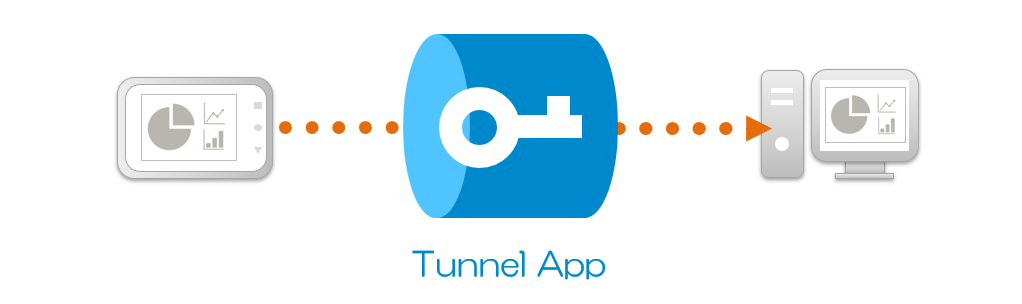
Tunnel App is Java-based so it runs on multiple devices!
Download
Android

Windows

Linux
Java (No JRE bundle, MacOS also available)
Install / Starting method
Windows
After installation, the terminal will launch and the initial screen (URL displayed on the terminal) will open in the browser.
 #############################
 #                           #
 #        Tunnel App         #
 #          tunsock          #
 #                           #
 #############################

 For the URL to access this device settings:
 http://127.0.0.1:10000/config/welcome?nonce=380213641155036629592696165290098817

 ===== CONNECTED =====
You can use Tunnel App by pressing the "Agree to the ToS and continue" button.
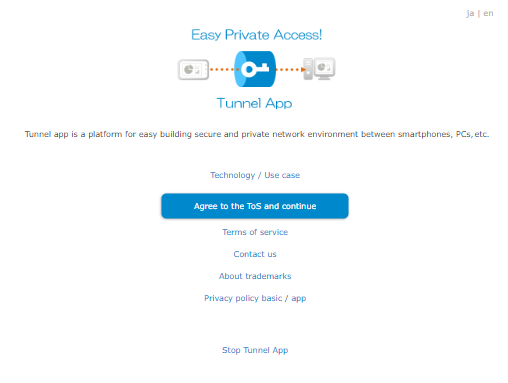
When downloading a ZIP file and launching the app
Copy the downloaded zip file to any location and extract it.
 PS C:\Users\USER>

 Mode                 LastWriteTime         Length Name
 ----                 -------------         ------ ----
 d-----        2023/12/17     14:12                TunnelApp_Windows_x64
Launch "TunnelApp_Windows.bat" in the folder.
 PS C:\Users\USER\TunnelApp_Windows_x64>

 Mode                 LastWriteTime         Length Name
 ----                 -------------         ------ ----
 -a----        2023/12/17     14:34            278 TunnelApp_Windows.bat
If the message "Windows protected your PC" is displayed, for the first time only, click "More info" and then "Run anyway". If the message "Do you want to run this file?" appears, click "Run".
If you want to uninstall, please delete the entire folder.
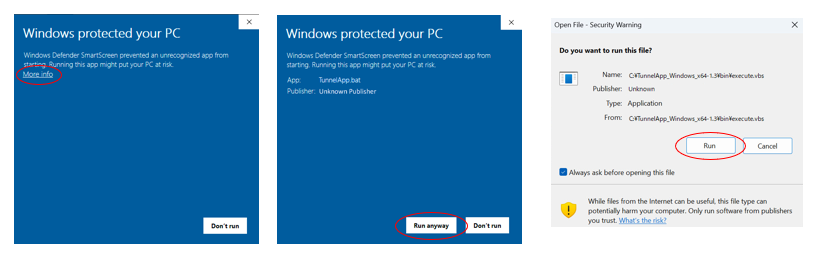
To stop Tunnel App, click the "Stop Tunnel App" link or close the terminal.
Linux
Copy the downloaded tar.gz file to any location and extract it.
 user@LINUX:/home/user$

 drwxrwxrwx 1 user user 512 Dec 23 10:58 TunnelApp_Linux_x64
Launch "TunnelApp_Linux.sh" in the directory.
user@LINUX:/home/user/TunnelApp_Linux_x64$ ./TunnelApp_Linux.sh
You can use Tunnel App by checking the contents of the Terms of Use URL displayed on the terminal, entering "y" at the prompt, and pressing enter.
 #################### Terms of service ####################
 Japanese:
  https://secure.tunsock.net/config/terms?lang=ja
 English:
  https://secure.tunsock.net/config/terms?lang=en

 Please agree to the terms of service at the URL above,
 if you want to continue and enter y:
 ...
 if you want to continue and enter y: y

 RESULT:OK

 #############################
 #                           #
 #        Tunnel App         #
 #          tunsock          #
 #                           #
 #############################

 This device number: 071581

 For the URL to access this device settings:
 http://127.0.0.1:10000/config/welcome?nonce=174117799430246717500292922644958508

 ===== CONNECTED =====
If a browser is installed on Linux, the settings screen will be displayed when you access the URL in the terminal.
 For the URL to access this device settings:
 http://127.0.0.1:10000/config/welcome?nonce=174117799430246717500292922644958508
To register this device as a server side device on another client side device, execute the following command to obtain the URL and access it using the browser on the client side device.
 user@LINUX:/home/user/TunnelApp_Linux_x64$ ./TunnelApp_Linux.sh reg


 Please use the client side device to access the URL below.
 This device will be registered as the server side device.
 The URL has an expiration date of 10 minutes and can only be used once.

 https://secure.tunsock.net/config/tunnel_setting?setting=26c4793d78d4a4dee37653626b3a216b75e80f9586b3205921bb176e3e30a4042c37e5e0b48506ceb927169457395f0fa14ca244ec0ab21599722b40139f69e0cb857ce73f1f9e7c902cc33be5a6740c.802324327fa8f5ba864d62383801f4a2a03fb302952f30fe98c4a201def7d25fc097799eb11183a27331fc1c2541eb378fe6f35954151f0b49df5c12b4df18340489a050f56481cfe865609826961267
To stop Tunnel App, click the "Stop Tunnel App" link, end the process with Ctrl + C, close the terminal, or execute the stop command below from another terminal.
user@LINUX:/home/user/TunnelApp_Linux_x64$ ./TunnelApp_Linux.sh stop
If you want to uninstall, please delete the entire directory.
Java (For MacOS)
Please install Java Runtime Environment (JRE) version 8 or later, such as OpenJDK. This explanation assumes that it is installed in "/usr/bin/java".
Copy the downloaded zip file to any location and extract it.
 macosuser@MACOSPC Documents %

 TunnelApp_Java
Launch "TunnelApp_Mac.sh start <JRE path>" in the directory with the terminal.
For Windows "TunnelApp_Windows.bat start <JRE path>"
For Linux "TunnelApp_Linux.sh start <JRE path>"
macosuser@MACOSPC TunnelApp_Java % ./TunnelApp_Mac.sh start /usr/bin/java
After the browser starts, the initial screen (URL displayed on the terminal) will open.
 #############################
 #                           #
 #        Tunnel App         #
 #          tunsock          #
 #                           #
 #############################

 For the URL to access this device settings:
 http://127.0.0.1:10000/config/welcome?nonce=380213641155036629592696165290098817

 ===== CONNECTED =====
You can use Tunnel App by pressing the "Agree to the ToS and continue" button.
To stop Tunnel App, click the "Stop Tunnel App" link, end the process with Ctrl + C, or close the terminal.
If you want to uninstall, please delete the entire directory.