
How to write a modal "spinning" loader display on the Web with CSS
October 01, 2024
When developing a web application, I want to display a loader that spins around on the screen while the server side processes it! I think you may think so. In some cases, this is supported by a web framework that includes a UI, but it may not be easy to install or it may be a hassle to prepare image data. Therefore, we will introduce an easy way to implement a modal loader using only CSS.
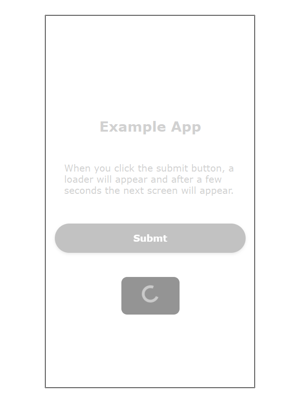
I think there are many different ways to express a loader, but I created a simple "spinner" type. Click here to display the actual sample screen in a separate window.
Description on CSS side
/* Spinner */
 #overlay {
	position: fixed;
	top: 0;
	left: 0;
	width: 100%;
	height: 120%;
	background: #ffffff;
	opacity: 0.7;
	z-index: 2;
	display: none;
	text-align:center;
}
.spinner {
    margin-top: 450px;
    padding-top: 15px;
    width: 100px;
    height: 50px;
    border-radius: 10px;
    margin-left: auto;
    margin-right: auto;
    background: #666666;
}
.spinner .circle {
    margin: auto;
    width: 20px;
    height: 20px;
    border-radius: 20px;
    border: 5px solid #dddddd;
    border-right-color: transparent;
    animation: spin 1s infinite linear;
}
 @keyframes spin {
    0% { transform: rotate(0deg); opacity: 0.6; }
    50%  { transform: rotate(180deg); opacity: 1; }
    100%   { transform: rotate(360deg); opacity: 0.6; }
}
The "animation" property of the "circle" element specifies the basic behavior of the animation. The operation name "spin" is "1s (1 second interval)" and "infinite" is "linear".
The details of "spin" are specified in "@keyframes". Between "0 to 50%", the transparency changes from "1 to 0.6" and rotates "180 degrees" to the right. Between "50 and 100%", the transparency changes from "0.6 to 1" and rotates "360 degrees" to the right.
Description on HTML side
The "overlay" element is a specification to make the entire screen modal when displaying the spinner, and is hidden by default. It is made modal by displaying the "overlay" with a semi-transparent white background at the forefront of the entire screen and making it impossible to operate. The "overlay" is written at the end of the body element, and "spinner" and "circle" elements are included within it.
<html>
...
<body>
	...
	<div id='overlay'>
		<div class='spinner'>
			<div class='circle'></div>
		</div>
	</div>
</body>
</html>
Description on Script side
Showing and hiding the modal loader is switched using the script below.
const displayLoader = function(display){
	if(display === undefined) display = true;
	if(display){
		document.getElementById("overlay").style.display = "block";
	}
	else{
		document.getElementById("overlay").style.display = "none";
	}
};
Reference site
- https://developer.mozilla.org/en-US/docs/Web/CSS/animation
- https://developer.mozilla.org/en-US/docs/Web/CSS/@keyframes
- https://developer.mozilla.org/en-US/docs/Web/CSS/transform-function/rotate
Until the end Thank you for reading! If you have any opinions, please feel free to send us a message.
Web · Script · CSS