

How to load Script/CSS files from static HTML with dynamic URLs
October 05, 2024
When developing a web application, even if you update files by changing the content of externally called Script/CSS on static HTML, there may be cases where old Script/CSS files cached in the browser are used and the screen is not displayed properly. Therefore, we will introduce a method to prevent cache usage by loading Script/CSS with dynamic URLs, even if it is static HTML.
This can be handled by preparing a script to load external Script/CSS resources. Click here to display the actual sample screen in a separate window.
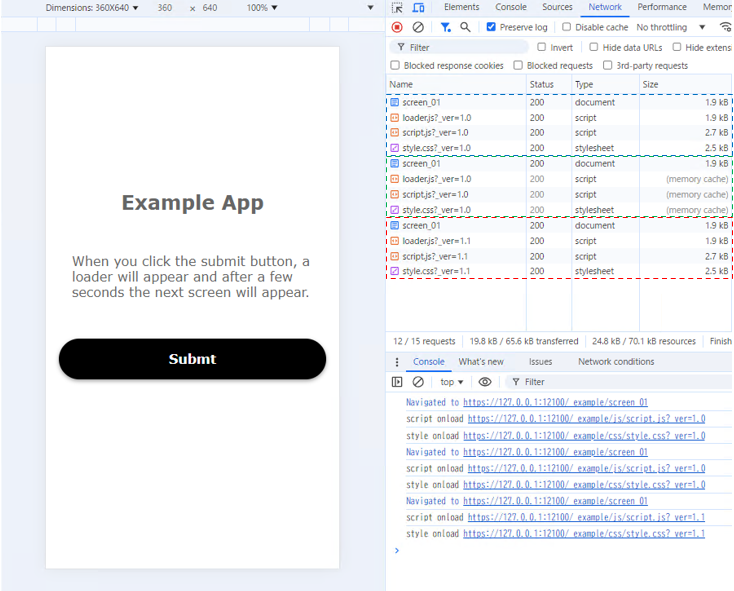
The same content is loaded from the server the first time (blue frame), and from the browser cache the second time (green frame). On the other hand, the third time (red frame) when the URL version value was changed, You can see that it is being loaded from the server.
Description on HTML side
In order to load the file "loader.js" that describes the script for dynamically loading Script/CSS, create a "script" element in the DOM on the HTML side, add it to the head element, and load it.
The "version" variable is intended to give a version to the URL of a static file. By changing that value along with updating the content, the URL will also change. Browsers generally cache content by URL including parameters, so the above method can prevent the use of old files in the cache. For example, there is a method of assigning a random value, but if you are using a content cache server such as a CDN, the effect will be lost, so I think it is better to use a fixed value with version control.
The "srcList" array variable contains the URLs of the Script/CSS files you want to load. The "loadSource" function is written in "loader.js".
Also, since the HTML content is visible for a moment before the CSS is loaded, write "opacity:0;" in the "content" element to set the initial value to be transparent. Then, change it to "opacity:1;" so that the contents will be displayed after all files have been loaded.
<html>
<head>
...
<script type="text/javascript">
const version = '1.0';
const srcList = [
	"./js/script.js",
	"./css/style.css"
];
(function(){
	const onLoad = function(){
		loadSource(srcList, version);
	};
	const appendScript = document.createElement('script');
	appendScript.async = false;
	appendScript.src = "./js/loader.js?_ver=" + version;
	appendScript.onload = onLoad;
	document.head.appendChild(appendScript);
})();
...
</script>
</head>
<body>
	<div class="content" style="opacity:0;">
	...
	</div>
...
</body>
</html>
Description on Script side
The "loadSource" function written in "loader.js" is as follows.
Since we want to read the Script/CSS files listed in "srcList" sequentially and synchronously, we need to start reading the next file after the current file has finished reading. Therefore, the "loadSource" function is called recursively in the "onload" event of the element added for loading.
const loadSource = function(srcList, version, onLoad, onError){
	if(!srcList) return;
	const lastIndex = srcList.lastIndex !== undefined ? srcList.lastIndex : 0;
	let src = srcList[lastIndex];
	srcList.lastIndex = lastIndex + 1;
	if(!src){
		const finished = function(){
			const content = document.getElementsByClassName("content");
			if(!content){
				setTimeout(finished, 10);
				return;
			}
			content[0].style.opacity = 1;
		};
		setTimeout(finished, 0);
		return;
	}
	let appendElement = null;
	let onLoadCallback = onLoad;
	let onErrorCallback = onError;
	if(src.toLowerCase().endsWith(".js")){
		appendElement = document.createElement("script");
		appendElement.async = false;
		appendElement.src = src + (version ? (src.indexOf("?") === -1 ?  "?" : "&") + "_ver=" + version : '');
		if(!onLoadCallback) onLoadCallback = function(element){  console.log("script onload " + element.src); };
		if(!onErrorCallback) onErrorCallback = function(element){  console.log("script onError " + element.src); };
	}
	else if(src.toLowerCase().endsWith(".css")){
		appendElement = document.createElement("link");
		appendElement.rel = "stylesheet";
		appendElement.href = src + (version ? (src.indexOf("?") === -1 ?  "?" : "&") + "_ver=" + version : '');
		if(!onLoadCallback) onLoadCallback = function(element){  console.log("style onload " + element.href); };
		if(!onErrorCallback) onErrorCallback = function(element){  console.log("style onError " + element.href); };
	}
	else{
		console.log("unknown suffix " + src);
		return;
	}
	appendElement.onload = function() {
		onLoadCallback(this);
		loadSource(srcList, version, onLoad, onError);
	};
	appendElement.onerror = function() {
		onErrorCallback(this);
		loadSource(srcList, version, onLoad, onError);
	};
	document.head.appendChild(appendElement);
};
Until the end Thank you for reading! If you have any opinions, please feel free to send us a message.
Web · Script · CSS