

Easily createdynamic pet imagesfor your blog content!
March 11, 2025
What do you do when you want to monitor your pet from outside at night? Expensive surveillance cameras can take infrared pictures at night, but if you don't have one, you have no choice but to leave the home's lights on. With the "SP Camera", you can easily solve this problem!
The access environment
For the access environment, we will prepare two Android smartphones for use on the shooting side and viewing side. Then, use the "SP Camera" as a network environment that connects Android smartphones. (This is a P2P app developed by us and provided free of charge)
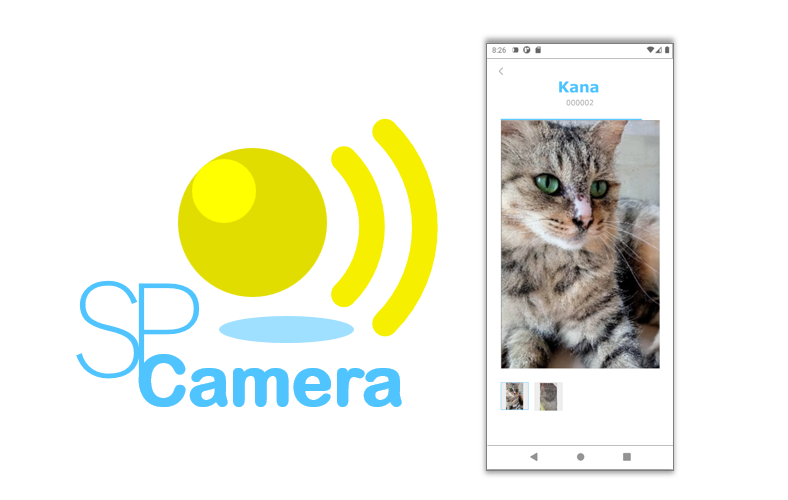
The SP Camera can be installed and used on two or more Android smartphones, and the camera images can be checked by simply linking the smartphones with a QR code. Camera image data between apps on your device is end-to-end encrypted, so you can safely access the data without it being seen by third parties.
Setup
For instructions on how to set up the SP Camera, please refer to the article "How to monitor your pets and family at home from anywhere using your Android smartphone camera".
Example of camera images as content
Camera images viewed with the "SP Camera" are stored on your smartphone as replay images, so you can save the range you need as multiple JPEG image files.
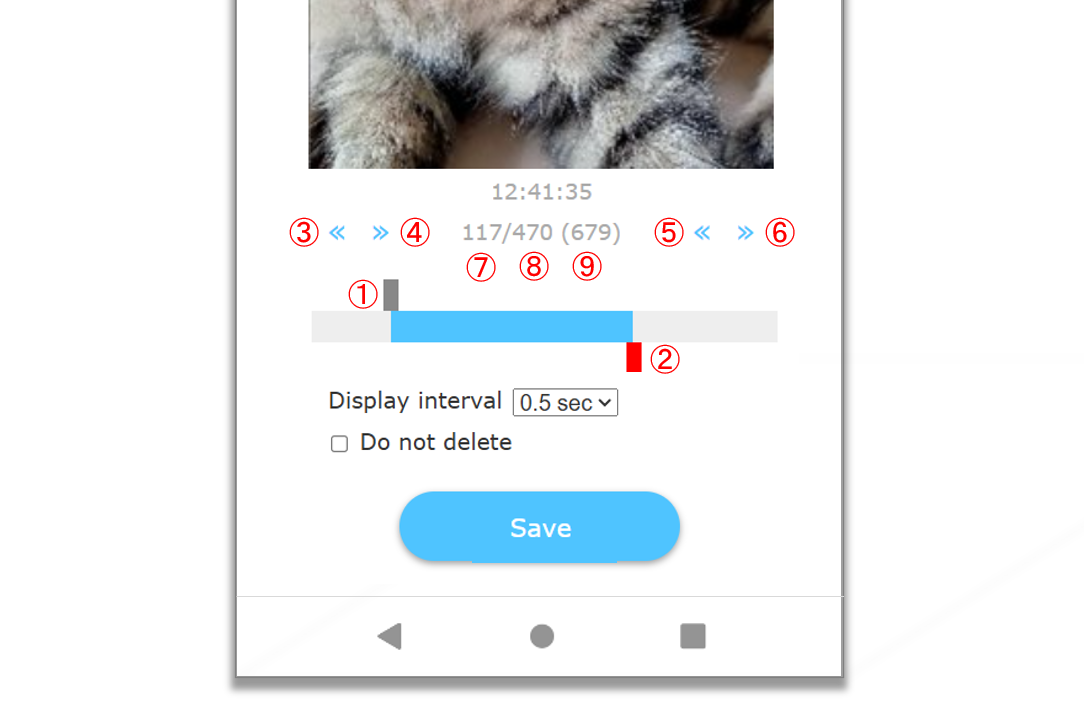
The method for specifying the replay image range is as follows:
- 1. Specify the position of the starting image by touching.
- 2. Specify the position of the ending image by touching.
- 3. Moves the position of the starting image backward one frame at a time.
- 4. Moves the position of the starting image forwardone frame.
- 5. Moves the position of the ending image backward one frame at a time.
- 6. Moves the position of the ending image forwardone frame.
- 7. The frame number of the image being displayed.
- 8. The frame number of the ending image.
- 9. This is the total number of frames in this replay image.
Example of code to be written on the content side
Below is an example of the HTML and script to be written on the content side that displays the camera image.
"imageDir" specifies the base URL for the content. "id" specifies the ID of the HTML element that will display the camera images. "folderName" specifies the name of the folder that will store the camera images. "rotate" describes the rotation angle of the camera image. "270" is landscape and "0" is portrait. By default, each frame of the camera images are displayed at 0.5 second intervals. The number at the end of the folder name indicates the total number of frames in this replay image.
<html>
...
<body>
...
<div id="imageReplayArea"></div>
<script type="text/javascript">
startImageReplay({
	imageDir: 'https://yoursite.domain/blog/',
	id: 'imageReplayArea',
	folderName:  '021261-20250211162445855-00014',
	rotate:  '270'
});
</script>
...
</body>
</html>
var startImageReplay = function(config){
	document[config.id + "_imageReplayConfig"] = config;
	if(config.startIndex === undefined) config.startIndex = 0;
	if(config.endIndex === undefined){
		var seqNum = config.folderName.substring(config.folderName.lastIndexOf('-') + 1, config.folderName.length);
		config.endIndex = parseInt(seqNum, 10) - 1;
	}
	if(config.interval === undefined) config.interval = 500;
	if(config.rotate === undefined) config.rotate = 270;
	if(config.width === undefined) config.width = '50%';
	if(config.maxWidth === undefined) config.maxWidth = '800px';
	if(config.backgroundColor === undefined) config.backgroundColor = '#efefe0';
	if(config.radius === undefined) config.radius = '20px';
	if(config.marginLeft === undefined) config.marginLeft = 'auto';
	if(config.marginRight === undefined) config.marginRight = 'auto';
	if(config.marginTop === undefined) config.marginTop = config.rotate === 0 || config.rotate === 180 ? '1rem' : 'auto';
	if(config.marginBottom === undefined) config.marginBottom = config.rotate === 0 || config.rotate === 180 ? '1rem' : 'auto';
	config.currentIndex = config.startIndex;
	config.imageReplayArea = document.getElementById(config.id);
	var imageReplay = null;
	var imagePath = config.imageDir + config.folderName + '/' + ('' + config.currentIndex).padStart(5, '0') + '.jpg';
	var html = "<img src=\"" + imagePath + "\" id=\"" + config.id + "_imageReplay\" style=\"display:none;\" onload=\"this.style.display = 'inline';updateImageReplay(document." + config.id + "_imageReplayConfig);\" onerror=\"this.style.display = 'none';\">";
	config.imageReplayArea.innerHTML = html;
}
var updateImageReplay = function(config){
	config.currentIndex++;
	if(config.currentIndex > config.endIndex) config.currentIndex = config.startIndex;
	if(!config.imageReplay){
		config.imageReplay = document.getElementById(config.id + "_imageReplay");
		if(config.rotate) config.imageReplay.style.transform = 'rotate(' + config.rotate + 'deg)';
		if(config.width) config.imageReplay.style.width = config.width;
		if(config.marginLeft) config.imageReplay.style.marginLeft = config.marginLeft;
		if(config.marginRight) config.imageReplay.style.marginRight = config.marginRight;
		if(config.marginTop) config.imageReplay.style.marginTop = config.marginTop;
		if(config.marginBottom) config.imageReplay.style.marginBottom = config.marginBottom;
		if(config.radius) config.imageReplayArea.style.borderRadius = config.radius;
		if(config.backgroundColor) config.imageReplayArea.style.backgroundColor = config.backgroundColor;
		if(config.maxWidth) config.imageReplayArea.style.maxWidth = config.maxWidth;
		config.imageReplayArea.style.textAlign = 'center';
		config.imageReplayArea.style.marginLeft = 'auto';
		config.imageReplayArea.style.marginRight = 'auto';
		config.imageReplay.style.display = 'inline';
	}
	var update = function(id){
		var config = document[id + "_imageReplayConfig"];
		var imagePath = config.imageDir + config.folderName + '/' + ('' + config.currentIndex).padStart(5, '0') + '.jpg';
		config.imageReplay.src = imagePath;
	}
	setTimeout(update.bind(null, config.id), config.interval);
};
The URL to access the camera images in the above example is as follows.
https://yoursite.domain/blog/021261-20250211162445855-00014/00000.jpg
https://yoursite.domain/blog/021261-20250211162445855-00014/00001.jpg
...
https://yoursite.domain/blog/021261-20250211162445855-00014/00018.jpg
https://yoursite.domain/blog/021261-20250211162445855-00014/00019.jpg
Until the end Thank you for reading! If you have any opinions, please feel free to send us a message.
P2P · Android · Camera · Web