
ブログのコンテンツに使える動きのあるペット画像を簡単に作成!
March 11, 2025
愛犬や愛猫などペットの様子をブログにしている方は、たくさんおられると思います。 とっておきの写真を撮って、アップしたいところですが、ずっとカメラで撮り続けるわけにもいかないですよね。 「SPカメラ」であれば、そんな悩みも簡単に解決できます!
アクセス環境の概要
アクセス環境は、撮影側と閲覧側で使用するためのAndroidスマホを2台用意します。 そして、Androidスマホ間を繋ぐネットワーク環境として「SPカメラ」を使用します。 (当方がアプリ開発を行い無料で提供しているP2Pアプリです)
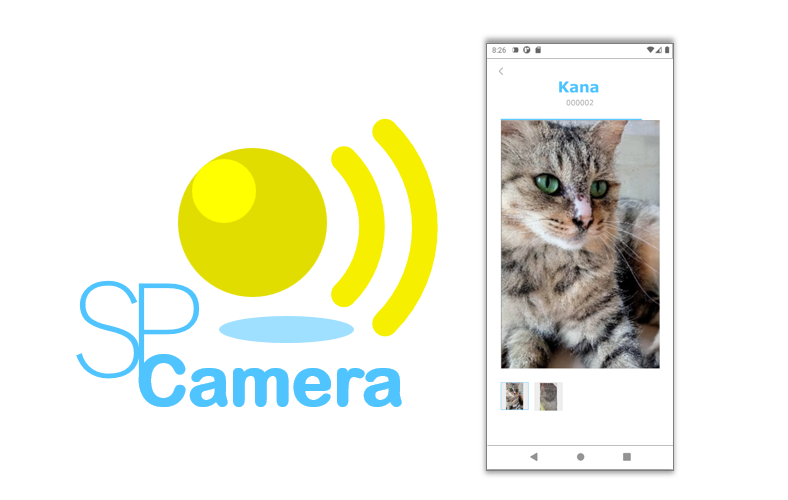
SPカメラは、2つ以上のAndroidスマホにインストールして使用し、QRコードでスマホ同士を紐付けるだけでカメラ映像が確認できます。 カメラ映像のデータはEnd-to-Endで暗号化しますので、その内容を第三者に見られることなく安全にアクセスすることができるようになっています。
セットアップ
SPカメラのセットアップ方法は、「Androidスマホのカメラを利用して、外出先から家のペットや家族を見守る方法」に記載していますので、そちらを参照していただければと思います。
カメラ映像をコンテンツにした例
「SPカメラ」で閲覧した画像は、リプレイ画像としてスマホに保管されていますので、必要な範囲を複数のJPEG画像ファイルとして保存することができます。
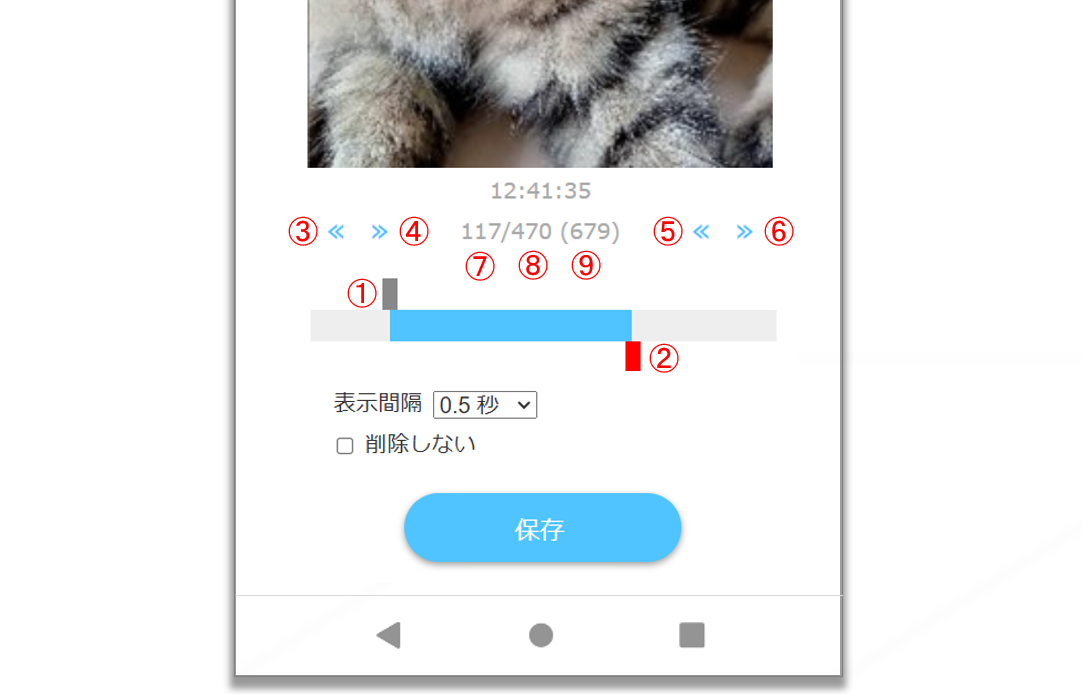
リプレイ画像の範囲の指定方法は以下の通りです。
- ①開始画像の位置をタッチで指定します。
- ②終了画像の位置をタッチで指定します。
- ③開始画像の位置を1フレームづつ前へ移動します。
- ④開始画像の位置を1フレームづつ後へ移動します。
- ⑤終了画像の位置を1フレームづつ前へ移動します。
- ⑥終了画像の位置を1フレームづつ後へ移動します
- ⑦表示している画像のフレーム番号です。
- ⑧終了画像のフレーム番号です。
- ⑨このリプレイ画像のフレーム全件数です。
コンテンツ側で記述するコード例
カメラ映像を表示するコンテンツ側で記述するHTMLとスクリプトの記述例は以下になります。
「imageDir」は、コンテンツのベースURLを記載します。 「id」は、カメラ映像を表示するHTML要素のIDを記載します。 「folderName」は、カメラ映像を格納するフォルダ名を記載します。 「rotate」は、カメラ映像の回転角度を記載します。「270」が横向きで「0」が縦向きです。 デフォルトでは、カメラ映像の各フレームを0.5秒間隔で表示するようにしています。 なお、フォルダ名の末尾の数字は、このリプレイ画像のフレーム全件数になっています。
<html>
...
<body>
...
<div id="imageReplayArea"></div>
<script type="text/javascript">
startImageReplay({
	imageDir: 'https://yoursite.domain/blog/',
	id: 'imageReplayArea',
	folderName:  '021261-20250211162445855-00014',
	rotate:  '270'
});
</script>
...
</body>
</html>
var startImageReplay = function(config){
	document[config.id + "_imageReplayConfig"] = config;
	if(config.startIndex === undefined) config.startIndex = 0;
	if(config.endIndex === undefined){
		var seqNum = config.folderName.substring(config.folderName.lastIndexOf('-') + 1, config.folderName.length);
		config.endIndex = parseInt(seqNum, 10) - 1;
	}
	if(config.interval === undefined) config.interval = 500;
	if(config.rotate === undefined) config.rotate = 270;
	if(config.width === undefined) config.width = '50%';
	if(config.maxWidth === undefined) config.maxWidth = '800px';
	if(config.backgroundColor === undefined) config.backgroundColor = '#efefe0';
	if(config.radius === undefined) config.radius = '20px';
	if(config.marginLeft === undefined) config.marginLeft = 'auto';
	if(config.marginRight === undefined) config.marginRight = 'auto';
	if(config.marginTop === undefined) config.marginTop = config.rotate === 0 || config.rotate === 180 ? '1rem' : 'auto';
	if(config.marginBottom === undefined) config.marginBottom = config.rotate === 0 || config.rotate === 180 ? '1rem' : 'auto';
	config.currentIndex = config.startIndex;
	config.imageReplayArea = document.getElementById(config.id);
	var imageReplay = null;
	var imagePath = config.imageDir + config.folderName + '/' + ('' + config.currentIndex).padStart(5, '0') + '.jpg';
	var html = "<img src=\"" + imagePath + "\" id=\"" + config.id + "_imageReplay\" style=\"display:none;\" onload=\"this.style.display = 'inline';updateImageReplay(document." + config.id + "_imageReplayConfig);\" onerror=\"this.style.display = 'none';\">";
	config.imageReplayArea.innerHTML = html;
}
var updateImageReplay = function(config){
	config.currentIndex++;
	if(config.currentIndex > config.endIndex) config.currentIndex = config.startIndex;
	if(!config.imageReplay){
		config.imageReplay = document.getElementById(config.id + "_imageReplay");
		if(config.rotate) config.imageReplay.style.transform = 'rotate(' + config.rotate + 'deg)';
		if(config.width) config.imageReplay.style.width = config.width;
		if(config.marginLeft) config.imageReplay.style.marginLeft = config.marginLeft;
		if(config.marginRight) config.imageReplay.style.marginRight = config.marginRight;
		if(config.marginTop) config.imageReplay.style.marginTop = config.marginTop;
		if(config.marginBottom) config.imageReplay.style.marginBottom = config.marginBottom;
		if(config.radius) config.imageReplayArea.style.borderRadius = config.radius;
		if(config.backgroundColor) config.imageReplayArea.style.backgroundColor = config.backgroundColor;
		if(config.maxWidth) config.imageReplayArea.style.maxWidth = config.maxWidth;
		config.imageReplayArea.style.textAlign = 'center';
		config.imageReplayArea.style.marginLeft = 'auto';
		config.imageReplayArea.style.marginRight = 'auto';
		config.imageReplay.style.display = 'inline';
	}
	var update = function(id){
		var config = document[id + "_imageReplayConfig"];
		var imagePath = config.imageDir + config.folderName + '/' + ('' + config.currentIndex).padStart(5, '0') + '.jpg';
		config.imageReplay.src = imagePath;
	}
	setTimeout(update.bind(null, config.id), config.interval);
};
上記の記述例でのカメラ映像へアクセスするURLは以下になります。
https://yoursite.domain/blog/021261-20250211162445855-00014/00000.jpg
https://yoursite.domain/blog/021261-20250211162445855-00014/00001.jpg
...
https://yoursite.domain/blog/021261-20250211162445855-00014/00018.jpg
https://yoursite.domain/blog/021261-20250211162445855-00014/00019.jpg
最後までお読みいただきありがとうございました!ご意見などございましたらメッセージをお寄せいただけると幸いです。
P2P · Android · Camera · Web